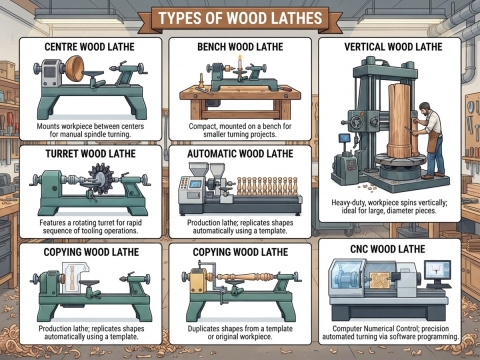
이 기계는 절삭 작업 자체를 자동화하지만, 그 과정에서 필요한 판단은 자동화하지 않습니다. 이 안내서는 바로 그러한 판단 과정을 다룹니다. 기계가 믿고 사용할 수 있는 재료를 선택하고 준비하는 방법, 가늘고 섬세한 작업이 조용하게 진행될 수 있도록 지지대를 설치하는 방법, 그려진 도면을 바탕으로 프로그래밍하는 방법, 첫 번째 절삭 결과를 판독하는 방법, 그리고 목선반에서 발생하는 거의 모든 불량품의 원인이 되는 몇 가지 증상을 진단하는 방법까지 설명합니다.

기계 작업 전: 재료 선택 및 준비
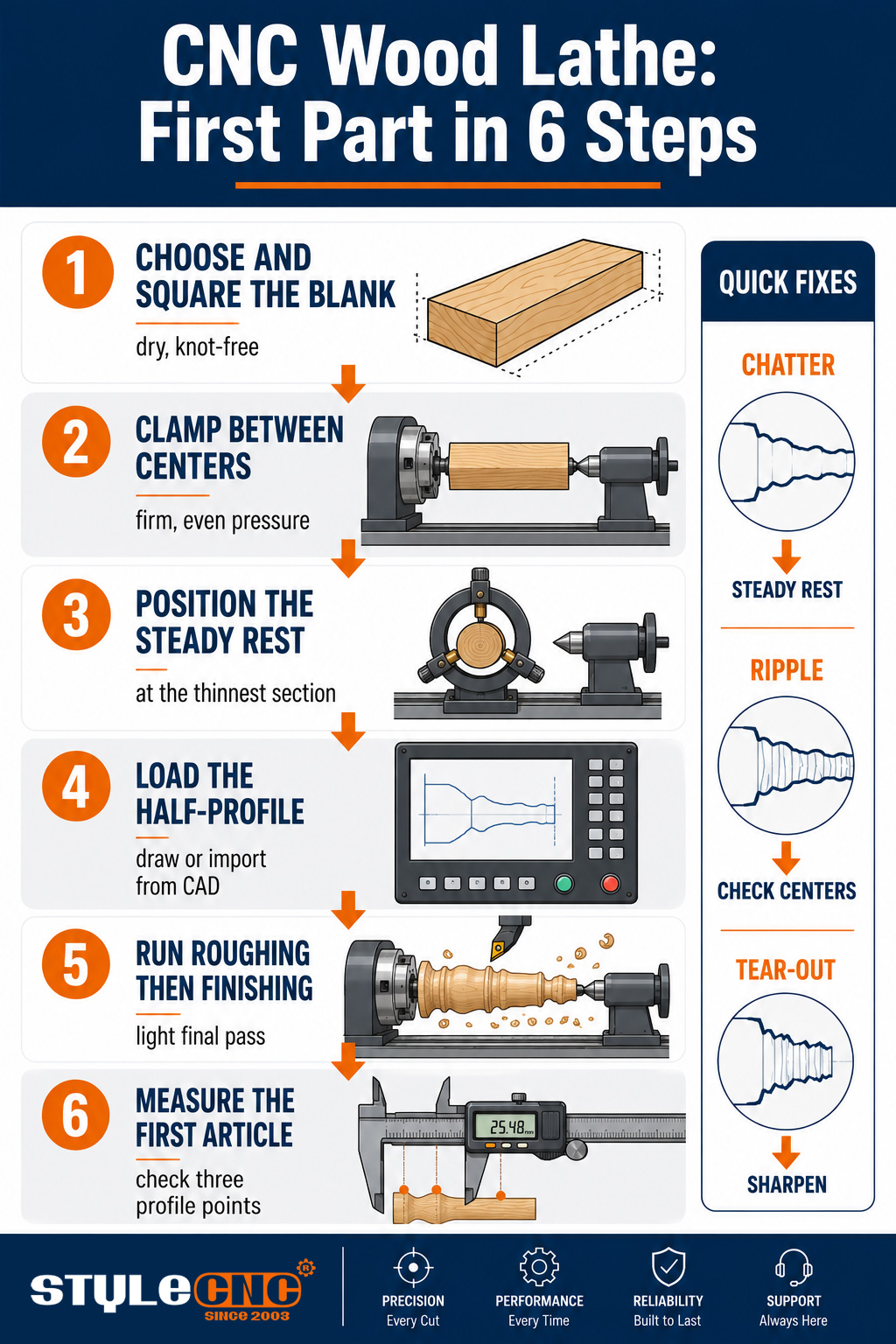
완성된 모든 프로파일은 시작점의 블랭크를 그대로 물려받기 때문에, 준비 작업은 전체 공정에서 가장 중요한 10분입니다. 가공할 길이를 따라 옹이가 없고 곧은 나뭇결을 가진 재료를 선택하세요. 가는 부분에 있는 옹이는 고속으로 가공할 때 떨어져 나갈 수 있습니다. 건조하고 안정적인 목재는 가공 후에도 치수를 유지하지만, 수분을 머금은 목재는 오늘 가공하면 둥글게 깎였다가 다음 주에는 타원형으로 변형될 수 있습니다.
가공할 재료는 정사각형 모양으로 고르게 절단하되, 양쪽 끝에 클램핑용 돌출부가 생기도록 완성품보다 약간 길게 자르십시오. 척 종류에 따라 중심을 표시하고 미리 구멍을 뚫는 것이 좋습니다. 재료가 중심에서 벗어나 장착되면 황삭 가공 시 재료가 고르지 않게 제거되고 기계가 처음부터 진동과 싸우게 되기 때문입니다. 주로 사용되는 재료는 활엽수입니다. 생산용 목재 가공 응용 분야너도밤나무, 단풍나무, 자작나무, 참나무는 모두 이 훈련을 통해 깔끔한 전정 작업을 할 수 있다는 것을 보여줍니다.
설치: 클램핑, 중심 맞추기 및 스테디레스트 사용
헤드스톡의 드라이브 척과 테일스톡의 라이브 센터 사이에 블랭크를 끼우고, 두 장치를 단단하고 고르게 조입니다. 너무 헐겁게 조이면 블랭크가 황삭 가공 시 미끄러지고, 너무 세게 조이면 블랭크가 휘어져서 프로파일 가공 시 원치 않는 곡선이 그대로 재현됩니다.
스테디 레스트는 가늘고 섬세한 가공물을 깎을 수 있는 기계와 단순히 브로셔에만 그런 기능을 명시해 놓은 기계를 구분 짓는 핵심 요소입니다. 사이클이 시작되기 전에 스테디 레스트 핑거를 프로그래밍된 가장 얇은 부분에 위치시켜야 합니다. 몇 센티미터도 안 되는 난간 기둥이나 야구 방망이 손잡이 같은 것은 지지대 없이는 날에서 휘어지기 쉽고, 그 결과 어떤 파라미터 변경으로도 해결할 수 없는 채터링 현상이 발생하기 때문입니다. 작업자들은 종종 "스핀들 양쪽 끝은 깨끗한데 왜 가운데는 거칠까요?"라는 질문을 여러 가지 표현으로 던집니다. 그 이유는 바로 휘어짐 때문이며, 스테디 레스트가 그 해결책입니다.
스핀업을 시작하기 전에 항상 안전 가드를 닫고, 새 목재가 처음 회전할 때는 회전면에서 떨어져 있어야 합니다. 눈에 보이지 않는 균열이나 느슨한 매듭이 떨어져 나가는 순간이 바로 그때이기 때문입니다. 이 습관은 단 2초밖에 걸리지 않습니다. 그렇지 않으면 스핀들 회전 속도에서 큰 실수를 하게 될 것입니다. 첫 번째 절삭부터 작동하는 집진기도 같은 맥락에서 중요합니다. 레일에 톱밥이 묻지 않도록 하고, 작업자가 작업 내내 호흡하는 공기 중에 미세 먼지가 들어가지 않도록 하기 위함입니다.
프로필 프로그래밍
이 프로그램은 반쪽 프로파일, 즉 완성품 한쪽 면의 끝에서 끝까지의 2D 윤곽선으로 시작합니다. 컨트롤러 소프트웨어에서 이 윤곽선을 그리거나 CAD 파일에서 불러와서 블랭크의 직경과 길이를 설정하면 소프트웨어가 황삭 및 정삭 가공 경로를 자동으로 생성합니다. 최신 기계에서는 템플릿을 제작하거나 G 코드를 직접 입력할 필요가 없습니다.
새 부품을 제작할 때마다 두 가지 프로그램 설정에 주의를 기울여야 합니다. 황삭 깊이는 사각형 블랭크가 한 번에 무리하게 가공되는 것이 아니라 여러 번에 걸쳐 부드럽게 가공되도록 설정하고, 정삭 이송 속도는 첫 번째 시제품 제작에 필요한 것보다 느리게 설정하십시오. 전체 도면에서 부품 제작까지의 워크플로는 소프트웨어 스크린샷과 예시를 통해 단계별로 자세히 설명되어 있습니다. 목선반 사용법 기초 가이드이는 첫 주 운영자에게 유용한 이 페이지와 잘 어울립니다.
첫 번째 단계: 매개변수 및 결과 해석
보수적으로 시작하고, 그 결과를 통해 여유분을 파악하세요.
• 스핀들 회전 속도일반적인 다리 직경의 경우 회전수를 수천 RPM 정도로 시작하고, 직경이 큰 경우에는 더 낮춘 다음, 절단면이 매끄럽게 유지되는 동안에만 회전수를 높이십시오.
• 황삭적당한 양의 사료를 얕게 급여하고, 목표는 둥근 모양의 고기를 얻는 것이지 표면을 깔끔하게 다듬는 것이 아닙니다.
• 마감: 한 번의 가벼운 연속 패스로 낮은 이송 속도로 표면을 생성하고, 두 번의 불규칙적인 패스로 흔적선을 생성합니다.
• 듣고 보세요깔끔하게 잘린 절단면은 균일한 소리를 내며 리본이 흩날립니다. 망치질하는 소리와 먼지가 나는 것은 절단면이나 이송이 잘못되었음을 의미합니다.
첫 번째 시제품을 제작하고 정지한 후, 배치 생산을 확정하기 전에 프로파일을 따라 3개 지점에서 도면과 비교하여 측정하십시오. 기계는 오류를 완벽한 일관성으로 40번 반복할 수 있으므로 첫 번째 시제품이 모든 검사 가치를 지닙니다. 다리, 난간 기둥 및 받침대의 완성품 예시는 다음과 같습니다. CNC 목재 선반 프로젝트 갤러리 샌딩 전 표면 상태가 어떤 모습이어야 하는지 보여줍니다.
문제 해결: 증상에서 원인으로, 그리고 해결 방법까지
목선반에서 발생하는 거의 모든 불량 부품은 다음 5가지 증상 중 하나와 관련이 있습니다.
| 징후 | 가능한 원인 | 수정 | 측량 |
|---|---|---|---|
| 얇은 단면의 채터 자국 | 지지대가 없는 상태에서 칼날로부터 멀어지면서 휘어짐 | 가는 부분에 스테디레스트를 추가하거나 위치를 조정하고, 절삭 깊이를 줄이십시오. | 패스 도중 정지 지점에서 편향이 관찰됨 |
| 프로필 전체를 따라 물결무늬가 나타납니다. | 중심부가 마모되었거나, 톱니가 헐거워졌거나, 날이 무뎌진 경우 | 센터를 다시 장착하고, 깁을 단단히 조이고, 날을 회전시키거나 교체하십시오. | 스핀들 회전에 따라 반복되는 리플 피치 |
| 무늬목의 뜯김 현상 | 목재에 비해 너무 강한 압력으로 가공하면 날이 무뎌집니다. | 마무리 이송 속도를 늦추고, 마지막으로 가볍게 연마한 후 날카롭게 갈아주세요. | 표면을 만져보면 손가락 끝으로 눌렀을 때 매끄럽게 느껴집니다. |
| 단면 골짜기의 연소 흔적 | 블레이드 체류 시간, 직경에 비해 속도가 너무 높음 | 골짜기 구간 이송량을 늘리고 스핀들 속도를 낮추세요. | 각 부분의 동일한 프로필 지점에 그을음이 나타납니다. |
| 제품 구성은 배치별로 다를 수 있습니다. | 블랭크가 일정하지 않고, 클램핑 압력이 변동합니다. | 블랭크 준비를 표준화하고 척과 테일스톡의 힘을 점검하십시오. | 직경이 연속된 10개 부분에 걸쳐 분포되어 있습니다. |
증상이 나타나면 테이블의 맨 위에서 아래로 순서대로 점검하고, 한 번에 하나의 변수만 변경하여 해결책을 찾으세요. 절단 문제뿐 아니라 전기 및 컨트롤러 오류를 포함한 더 심층적인 진단 트리는 에 있습니다. 목선반 문제 해결 가이드이는 기기 옆에 북마크해 둘 페이지입니다.
절삭력을 유지하는 데 필요한 유지 관리 리듬
• 모든 교대레일과 나사에서 톱밥을 깨끗이 제거하고 첫 번째 작동 주기 전에 날의 가장자리를 점검하십시오.
• 매주가이드웨이와 볼스크류에 매뉴얼에 명시된 일정에 따라 윤활유를 주입하고, 테일스톡 정렬 상태를 확인하십시오.
• 월간 회원벨트 장력을 점검하고, 깁 조정을 확인하고, 센터가 제대로 작동하는지 확인하십시오.
• 착용한 상태: 절단면이 뜯겨 나가는 조짐이 보이면 즉시 프로파일 블레이드를 회전시키거나 날카롭게 갈아야 하며, 재료가 망가진 후에 갈아서는 안 됩니다.
모든 배치 작업 전 비행 전 점검 목록
✓ 원목은 곧고 건조하며, 옹이 검사를 완료하고 일정한 길이로 절단되었습니다.
✓ 척과 테일스톡이 단단하고 고르게 장착되었는지 확인하고, 스테디 레스트를 가장 얇은 부분에 위치시키십시오.
✓ 프로파일 로드 완료, 블랭크 치수 설정 완료, 황삭 깊이 및 정삭 이송량 검토 완료.
✓ 날 점검 완료, 안전장치 닫힘, 추출 장치 작동 중.
✓ 배치 생산 전에 첫 번째 제품을 3개 프로파일 지점에서 측정합니다.
자주 묻는 질문
어떤 스핀들 속도로 시작해야 할까요?
일반적인 다리 재료의 경우 회전수를 수천 RPM 정도로 낮춰 시작하고, 큰 직경의 경우 더 느리게 회전수를 높인 다음, 절삭이 부드럽고 조용하게 유지되는 동안 회전수를 점차 높이십시오. 적절한 속도는 금방 알 수 있습니다. 잘못된 속도에서는 먼저 진동이 발생하거나 재료가 타버립니다.
내 부품이 가운데 얇은 부분에서만 덜컹거리는 이유는 무엇인가요?
가느다란 소재는 가장 얇은 부분에서 칼날로부터 휘어지면서 진동이 발생하고, 이 진동이 채터링으로 나타납니다. 이 부분에 스테디레스트를 위치시키고 마무리 절삭량을 줄이십시오. 속도나 이송 속도를 변경해도 스테디레스트의 역할을 대신할 수 없습니다.
재료를 넣기 전에 모서리를 둥글게 다듬어야 하나요, 아니면 기계가 사각형 재료도 사용할 수 있나요?
생산 기계는 정사각형 소재를 직접 가공하여 황삭 가공을 통해 몇 초 만에 원형으로 만듭니다. 중요한 것은 정사각형 소재가 곧고 중심에 맞춰져 있어야 한다는 점입니다. 중심이 맞지 않는 소재는 원형이 될 때까지 매 회전마다 날에 강한 충격을 가하기 때문입니다.
무늬목이나 곱슬목재의 뜯김 현상을 어떻게 방지할 수 있을까요?
먼저 날카롭게 연마한 다음 마무리 이송 속도를 늦추고 가볍게 마지막 연마를 하십시오. 나뭇결은 끊임없이 방향이 바뀌기 때문에 날카로운 날과 부드러운 이송 속도로만 깨끗하게 깎을 수 있습니다. 나뭇결이 매우 복잡한 경우에는 연마 여유분을 미리 설정해 두는 것이 좋습니다.
프로파일 블레이드는 얼마나 자주 연마하거나 교체해야 하나요?
달력 날짜가 아닌 상태를 기준으로 판단하세요. 이전에는 깨끗하게 절단되었던 목재에 처음으로 뜯김 현상이 발생하거나 표면이 거칠어지는 것이 절단 시기를 알려주는 신호입니다. 밀도가 높은 경목을 매일 가공하는 작업장에서는 매주 절단면을 다듬고, 생산을 중단하지 않고 교체할 수 있도록 날카롭게 연마된 예비 절단면을 준비해 둡니다.
완성된 프로필에 미세한 나선형 물결 무늬가 나타납니다. 무엇이 원인일까요?
규칙적인 나선형 패턴은 회전 방향을 따라 나타나며 마모되거나 헐거워진 센터, 깁 유격 또는 날이 날카로움을 넘어선 날과 같은 기계적 결함을 가리킵니다. 프로그램 작업을 시작하기 전에 센터를 다시 제자리에 고정하고, 깁을 단단히 조이고, 날을 교체하십시오.
생나무나 반쯤 마른 나무를 가공할 수 있나요?
기계는 절삭은 하겠지만, 절삭된 부품은 원하는 모양을 유지하지 못합니다. 생재는 건조되면서 변형되기 때문에 대량 생산용 선삭 작업에는 건조되고 안정적인 재료가 필요합니다. 생재 선삭은 의도적으로 건조 시간을 두는 수공예용 그릇 제작에 적합하며, 대량 생산용 스핀들 작업에는 적합하지 않습니다.
일상적인 유지보수 중에서 실제로 가장 중요한 것은 무엇일까요?
매 교대 근무마다 레일과 나사를 다듬고, 정해진 일정에 맞춰 윤활유를 바르고, 날의 상태를 항상 깨끗하게 유지하세요. 이 세 가지 습관은 마모로 인한 소음, 진동, 그리고 정확도 저하를 방지합니다. 매뉴얼에 있는 다른 모든 사항도 중요하지만, 이 세 가지는 매일매일 그 효과를 발휘합니다.
올바른 컴퓨터에서 다음 단계를 실행하십시오.
위의 모든 기술은 견고한 지지대, 정확한 중심, 그리고 프로파일을 지원하는 컨트롤러를 갖춘 기계를 전제로 합니다. 다양한 구성들을 비교해 보세요. CNC 목재 선반은 선삭 및 조각 작업에 사용됩니다. 교육이 포함된 무료 견적을 받아보세요.